3D animation videos have a unique fan base on social media platforms. Many creators love watching animated characters dancing, acting, or performing reels because these videos look creative, eye-catching, and different from normal content. Even though 3D animation looks very complex, the truth is that creating a 3D animated video is much easier than most people think.
A lot of people are still unaware of how these videos are created and assume that professional software or animation skills are required. But with the help of AI tools, you can now convert your simple video into a 3D animated video for free and within a few minutes. You do not need animation experience, editing knowledge, or expensive software.
In this article, we are going to explain in detail how you can create your video to 3d animation video using AI, simply by following the steps mentioned below. Make sure to read the full article carefully so you do not miss any important details.
Table of Contents
What Is AI 3D Animation Video?
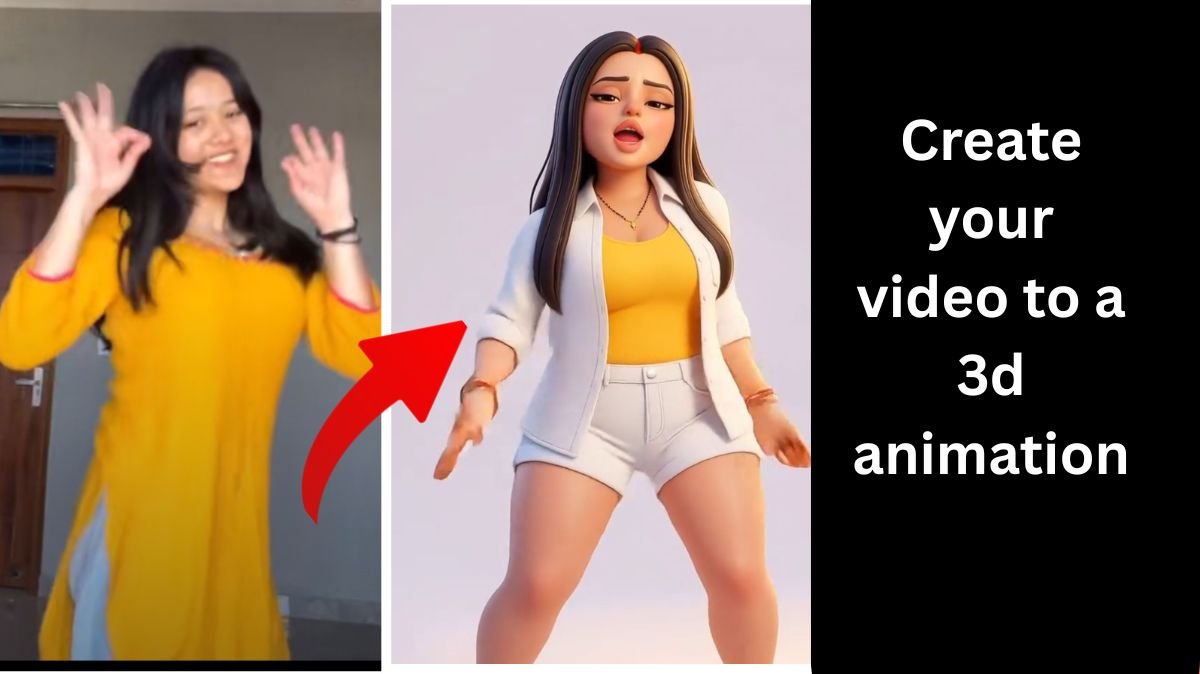
AI 3D animation video is created using artificial intelligence, where AI converts a normal image or video into a 3D animated character. The AI system generates a 3D-style character from your image and then applies motion from a dancing or moving video.
This process works on motion control technology, where AI copies movements from one video and applies them to a 3D character image. This is the same technique used in many viral animated reels on Instagram and YouTube Shorts.
How to create your video to 3d animation (Step-by-Step)
Below is a simple and easy step-by-step guide to creating a 3D animated video for free.

Step 1: Create Your 3D Animation Character Using Gemini
First of all, you need to create a 3D animation character image, because this image will be used later to add motion.
What You Have to Do:
- Open Gemini AI
- Upload your image (a clear photo works best)
- After uploading the image, add the prompt that converts your image into a 3D animation style
Prompt:- Create a cute 3D chibi-style this Indian girl character in full body, long shot wearing a white shirt blue jeans pant outfit such as in rich festive colors with subtle ethnic patterns. He is wearing white shoes footwear and simple ethnic accessories if needed. He has a big head with baby-like proportions, chubby cheeks, smooth soft skin, and a joyful expression with closed smiling eyes. The pose is playful and confident: keep my face 100% same as of the reference photo.
Within a few seconds, Gemini will generate a 3D animated character image for you. This image will look like a cartoon or animated version of yourself or the person in the photo. Once the image is generated, download and save it on your device, because we will use it in the next step.
Step 2: Download the Kling AI Application
Now we have to add motion to the 3D character.
For that:
- Download Kling AI
- It is available for both Android and iOS
- Install and open the application
After installing, simply log in to the app using your email or social account.
Step 3: Open the AI Video Option in Kling AI
Once you are inside the Kling AI app:
- Look at the upper right corner
- You will see an option named AI Video
- Simply click on that option
This will take you to the video creation section.
Step 4: Select Motion Control Feature
After clicking on AI Video:
- Again, at the upper right corner, you will see the Motion Control icon
- Click on Motion Control
This feature allows you to duplicate movements from a video and apply them to an image.
Step 5: Add 3D Character Image
Now you will see two options.
The first option is Add Character Image.
Here:
- Upload the 3D animated image that you generated using Gemini
- Make sure the image is clear and properly framed
This image will become your animated character in the final video.
Step 6: Add Motion Video
Below the character image section, you will see Add Motion Video.
In this section:
- Upload your dancing video
- Or upload any other character dancing video
- You can also use trending dance reels for better results
The AI will analyze this video and copy its movements.
Step 7: Generate the 3D Animated Video
After adding both:
- 3D character image
- Motion video
Simply click on the Generate icon.
The AI will take a few seconds to process the video. Once the process is complete, your 3D animated video will be ready.
You can now:
- Download the video
- Share it on Instagram Reels
- Upload it to YouTube Shorts
- Post it on any social media platform
Why 3D Animation Videos Perform Well on Social Media
3D animated videos are popular because:
- They look creative and unique
- They stand out from normal videos
- People love animated characters
- Dance animations get high engagement
This is why many creators are switching to AI-based 3D animation content.
Final Thoughts
Creating a 3D animation video is no longer difficult or expensive. With the help of Gemini AI and Kling AI, you can easily convert your normal image and video into a professional-looking 3D animated video within minutes.
Just follow the steps properly, experiment with different dance videos, and stay consistent. This method is perfect for beginners, content creators, and anyone who wants to grow on social media using trending AI content.