Recently on social media, a lot of videos are going viral and people are curious about how these types of videos are created. In these videos, people are showcasing their own chibi characters, which resemble cute cartoon versions of themselves. This trend is growing very fast because the results are fun, unique, and eye-catching.
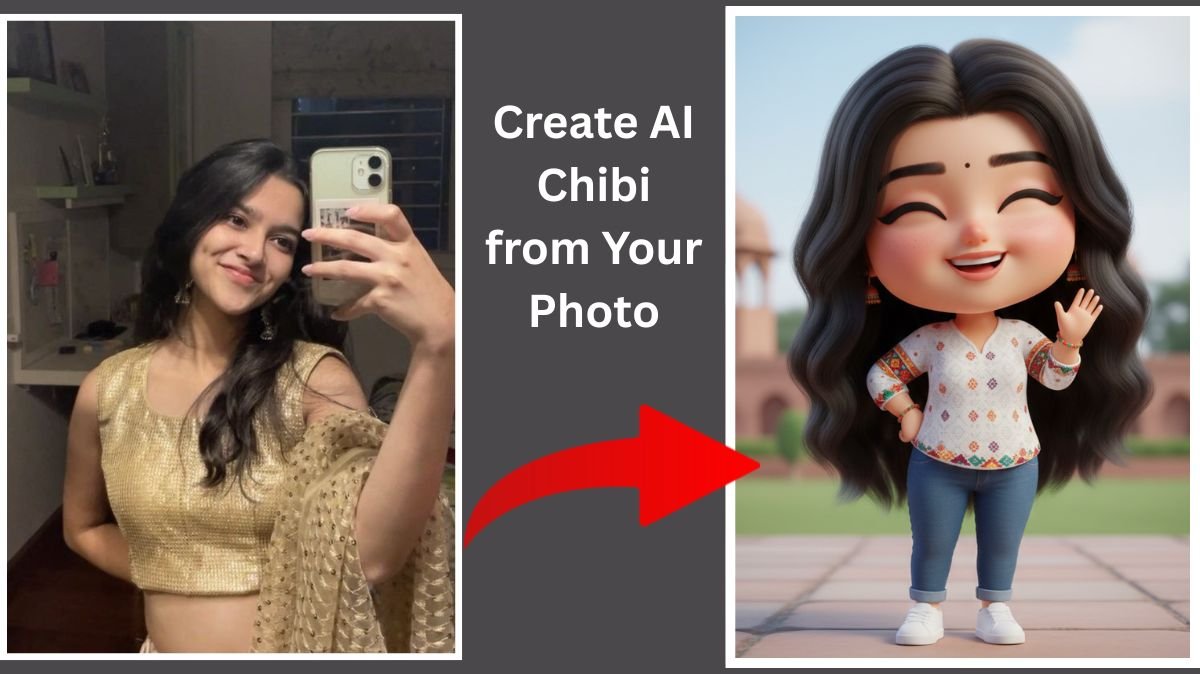
A chibi character is a type of cartoon character with a big head, small body, cute facial expressions, and anime-style design. Earlier, creating such characters required professional artists and a lot of money. But now, in the era of AI, anyone can create a chibi character in just a few seconds.
With the help of AI image generators, you only need to upload your photo and give a proper prompt. The AI will automatically analyze your image and generate a chibi version for you. After that, animating the chibi image into a video is also a very simple process, which we are going to explain in detail in this article.
Table of Contents
What Is an AI Chibi Character?
An AI chibi character is a cartoon-style character generated using artificial intelligence. It is inspired by Japanese anime art style and designed to look cute, expressive, and playful. AI chibi characters are widely used for social media content, profile pictures, reels, shorts, stickers, and personal branding.
Using the right AI chibi prompt is very important because it helps the AI understand exactly what type of character you want. This is why many creators are now trying to create best AI chibi of your image with AI chibi prompt in 2026.
How to Create AI Chibi of Your Image
- To create an AI chibi image, first of all, you need a photo. You can use your own image for this. Make sure the image is clear, well-lit, and your face is visible properly.
- After that, click on the image generator button provided. This will redirect you to Gemini AI. Once you open Gemini, log in using your Google account.
- After logging in, upload the image that you want to convert into a chibi character. Once the image is uploaded, paste the AI chibi prompt into the prompt box. Then click on the generate button.
- Within a few seconds, the AI will generate a high-quality chibi image based on your photo. The result will look cute, cartoon-style, and very similar to your real face.
AI Chibi Prompt
You can use the following prompt for the best results:
“Create a cute 3D chibi-style Indian girl character in full body, long shot, wearing a white shir,t blue jeans pant outfit such as in rich festive colors with subtle ethnic patterns. He is wearing white shoes and simple ethnic accessories if needed. He/she has a big head with baby-like proportions, chubby cheeks, smooth soft skin, and a joyful expression with closed smiling eyes. The pose is playful and confident: keep my face 100% same as of the reference photo.”
You can customize the prompt by adding outfit details, background style, or facial expressions.
How to Animate an AI Chibi Image
- After creating the chibi image, the next step is animation. This is what makes these videos go viral on social media platforms.
- To animate your AI chibi image, click on the create animation button. This will redirect you to an AI animation tool. Log in using your Google account.
- After logging in, upload the chibi image that you generated using Gemini. Then paste the animation prompt into the prompt section and click on generate.
- The AI will take a few seconds to process and animate your image. Once done, your animated chibi video will be ready to download and share.
AI Chibi Animation Prompt Example
You can use this prompt for animation:
“Animate this chibi character with smooth and cute movements. Add natural blinking, smiling, and slight head movement. Make the animation lively, joyful, and social-media friendly with soft motion and clean transitions.”
Why AI Chibi Videos Are Going Viral in 2026
AI chibi videos are trending because they are cute, engaging, and very easy to create. They grab attention quickly and perform well on platforms like Instagram Reels, YouTube Shorts, and TikTok.
In 2026, AI tools have become more advanced and user-friendly. This is why more people are choosing to create best AI chibi of your image with AI chibi prompt in 2026 and share their creativity online.
Tips to Get Best AI Chibi Results
Always use a clear and front-facing image
Write a detailed and descriptive prompt
Mention anime or chibi art style clearly
Avoid blurry or dark photos
Try different prompts for better variations
Final Words
Creating your own AI chibi character and animating it into a video is now very simple. You do not need any design or animation skills. With the help of AI tools like Gemini and AI animation platforms, anyone can create professional-looking chibi images and videos in minutes.
All you need is your image, a well-written AI chibi prompt, and a little creativity. Follow the steps shared in this article and enjoy the trend of creating chibi characters using AI.