Today, the internet is filled with AI-generated photos. Wherever you look, on Instagram, YouTube Shorts, TikTok, or Pinterest, you will see highly professional, cinematic-looking AI images that feel like they were shot using expensive cameras and edited by expert designers. Many creators are using different types of AI prompts to generate these images, but the biggest problem is that most people do not know which prompt was used in viral images.
Because of this, beginners often feel confused. They try random prompts, but the output does not look anywhere close to those viral cinematic photos. That is exactly why this article is created. In this guide, we will explain everything about AI photo editing prompts in a simple, human tone and also provide useful prompts that you can use for free in Gemini.
If you follow this article properly, you will be able to create stunning AI images without any paid tools or advanced editing skills.
What Are Ai Photo Editing Prompts and Why Are They Important?
An AI photo prompt is simply a detailed instruction that tells the AI how the image should look. The better and more descriptive your prompt is, the better output you will get. Viral AI images usually use long, well-structured prompts that include details like:
- Lighting style
- Camera angle
- Background depth
- Facial details
- Mood and emotion
- Color grading
- Cinematic effects
Most people fail because they use very short prompts like “make this photo cinematic,” which is not enough for AI to understand what you want.
How to Use AI Photo Editing Prompts in Gemini
Using Gemini for AI photo editing is very easy. You just need to follow a few simple steps.
Step 1: Visit Gemini
First of all, open Gemini in your browser or app. Log in using your Gmail ID.
Step 2: Upload Your Reference Image
After logging in, upload the photo you want to enhance or transform. This can be a selfie, portrait, or any normal image.
Step 3: Copy the Prompt
Now, copy the AI prompt provided in this article (or any prompt you like).
Step 4: Paste Prompt into Gemini
Paste the prompt into Gemini along with your uploaded image.
Step 5: Submit and Generate
Click on submit. Within a few seconds, Gemini will generate a professional AI image for you.
That’s it. No complex editing, no software skills required.
Best Ai Prompts

Divine photo and video editing prompt
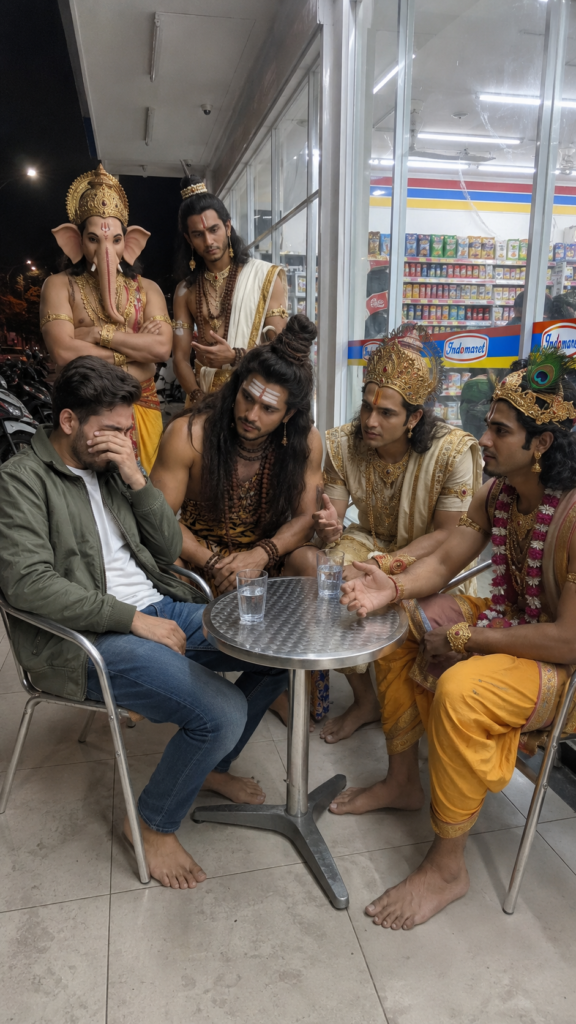
Photo prompt:- RAW iPhone 15 Pro candid photo, indistinguishable from a real photograph, not AI-generated in any way. POV realistic iPhone photo, vertical 9:16 aspect ratio, raw unedited camera quality, no filters, no HDR, natural smartphone photography with slight grain, realistic lighting imperfections, authentic social media snapshot aesthetic. **IMPORTANT FACE REQUIREMENT (HIGHEST PRIORITY):** Use the uploaded reference image for exact facial identity preservation. The young Indian man must retain 100% of the same face, facial structure, skin tone, hairstyle, beard, glasses (if present), jawline, eyes, nose, lips, facial proportions, and all recognizable features from the reference image. Do not modify, beautify, stylize, age, de-age, enhance, or alter the face in any way. Maintain perfect likeness and identity accuracy. The face must look exactly like the uploaded person photographed in this new situation. ### Setting & Background Nighttime outside a local Indomaret convenience store. Outdoor seating area beside a large glass wall. Bright fluorescent canopy lights overhead creating slightly harsh shadows and realistic convenience-store lighting. Behind the group are large windows showing visible snack shelves, drinks, refrigerators, and convenience-store branding. Left side reveals a dark street with parked motorbikes and distant streetlights. Clean tiled minimarket floor with realistic reflections. Authentic Southeast Asian convenience-store atmosphere. ### Props & Environment Small round metal table. Several simple glasses of water on the table. Basic metal chairs surrounding the table. Natural convenience-store environment. No staged appearance. ### Subjects #### Subject 1 (Boy from Uploaded Reference Image) Seated on the left side. Wearing the exact same clothes shown in the uploaded reference image. Barefoot. Leaning back slightly. Covering part of his face while crying emotionally. Visible tears. Looks heartbroken and overwhelmed. Face preserved exactly from reference image. #### Subject 2 (Lord Shiva) Center position, dominant presence. Realistic human interpretation. Long matted hair. Rudraksha beads. Tiger-print cloth and traditional accessories. Barefoot. Leaning forward slightly. Sharp, intense expression. Looking directly at Subject 1 with deep concern and disappointment. #### Subject 3 (Lord Vishnu) Seated on the right side. Realistic human interpretation. Traditional royal attire. Elegant ornaments. Barefoot. Calm and focused expression. Speaking to Subject 1 with gentle hand gestures. Looks like he is explaining something logically and wisely. #### Subject 4 (Lord Krishna) Realistic human interpretation. Peacock feather crown. Traditional royal clothing. Elegant jewelry. Barefoot. Kind and composed expression. Looking directly at Subject 1. Trying to comfort him with compassion. #### Subject 5 (Lord Ganesha) Standing behind the group. Realistic divine appearance. Traditional attire. Barefoot. Arms crossed. Listening carefully. Neutral but serious expression. Focused on Subject 1. #### Subject 6 (Lord Balarama) Standing behind the group. Traditional attire fitting his character. Barefoot. Calm and wise expression. Listening attentively. Appears to be giving thoughtful advice. ### Pose & Interaction Casual late-night "nongkrong" gathering outside a convenience store. Emotionally heavy atmosphere. Feels like close friends helping someone through a difficult moment. Nobody is posing. Nobody is looking at the camera. Everyone is focused on Subject 1. Natural candid moment captured unexpectedly. Authentic human interaction. ### Barefoot Requirement (VERY IMPORTANT) All subjects must be completely barefoot. No shoes. No sneakers. No sandals. No slippers. No socks. No boots. No flip-flops. No footwear of any kind. No footwear visible anywhere in the image. No footwear under chairs. No footwear beside the table. No footwear in the background. Feet naturally touching the tiled floor. ### Styling Grounded realistic modern-world appearance. No fantasy armor. No exaggerated mythology costumes. Realistic human versions of divine characters. Premium-looking rings, bracelets, necklaces, and accessories. Natural fabrics and textures. ### Lighting & Camera Feel Overhead fluorescent convenience-store lighting. Slightly overexposed highlights. Uneven shadows. Natural night-time lighting. No flash. No professional lighting setup. Natural smartphone dynamic range. Minor motion blur. Slight sensor noise. Realistic white balance imperfections. Handheld phone-camera feel. ### Realism Requirement (HIGHEST PRIORITY) Must look exactly like a genuine candid iPhone photo taken by a friend sitting nearby. Absolutely no AI-generated appearance. No cartoon look. No anime style. No digital art. No illustration. No painting effect. No CGI. No 3D render. No fantasy artwork. No game character appearance. No movie-poster composition. No cinematic hero shot. No stylized faces. No beauty-filter skin. Natural skin pores. Natural wrinkles. Natural imperfections. Authentic facial textures. Messy realistic lighting. Photojournalism realism. Documentary photography style. Instagram-worthy but completely authentic. Indistinguishable from a real smartphone photograph. ### Camera Details iPhone 15 Pro camera. 26mm equivalent lens. Vertical 9:16 framing. Eye-level angle. Slight handheld shake. Natural depth of field. Realistic smartphone processing. Unedited appearance. ### Negative Prompt cartoon, anime, manga, illustration, painting, artwork, digital art, CGI, 3D render, unreal engine, octane render, fantasy art, game character, doll face, plastic skin, beauty filter, AI-generated look, synthetic lighting, glowing aura, mystical effects, fantasy particles, excessive sharpness, overprocessed image, fake skin texture, low quality, blurry face, duplicate face, distorted face, altered identity, extra fingers, extra limbs, cropped feet, footwear, shoes, sneakers, sandals, slippers, socks, boots, flip-flops, camera pose, looking at camera, studio lighting, cinematic poster, unrealistic colors, watermark, logo, text.
Video prompt :- Ultra-realistic cinematic night-time video outside a brightly lit 7-Eleven convenience store in a modern Indian city. A young Indian man wearing a casual outfit (shirt/hoodie with jeans) sits at a small metal table, emotionally crying with watery eyes, trembling lips, and visible sadness. His posture is slightly slouched, one hand covering part of his face. The atmosphere is emotional yet slightly lighthearted, illuminated by realistic store lights, streetlights, reflections on the pavement, and soft cinematic bokeh.Lord Shiva stands beside him in a divine human form, wearing traditional tiger-skin attire, rudraksha beads, a snake around his neck, ash markings on his forehead, and long flowing hair. He gently leans toward him with a calm and caring expression, offering emotional support while speaking.Lord Krishna stands nearby in royal yellow silk attire with elegant jewelry and a peacock-feather crown, smiling warmly and making playful hand gestures, trying to cheer him up with humor and friendliness.Behind them stands Lord Ganesha in majestic traditional attire, watching the scene with a patient, wise, and affectionate expression.🎥 Scene & Dialogue FlowOpening Shot (Close-up)Camera focuses on the crying young man. Tears roll down his cheeks as he says:“और पता है क्या-क्या हुआ?”Cut to Lord Shiva (Medium Close-up)Shiva leans slightly forward, calm and reassuring, saying:“मैं हूँ ना, भाई।”Cut to Lord Krishna (Playful Tone)Krishna smiles, raises his hands jokingly and says:“अरे भाई, चुप हो जा यार… वरना राधे मुझे ही डाँटेगी! चल चुप हो जा, चॉकलेट चिप्स दिलाऊँगा।”Emotional ShiftThe man slowly starts calming down, breathing stabilizes.Cut to Shiva (Humorous Moment)Shiva looks upward toward Ganesha with a tired but slightly amused expression, shaking his head and saying:“I’m done with him, पिताजी… पहले ही बोला था मत भेजो इसे धरती पे, नहीं संभल पाएगा।”Final Reaction (Ganesha)Ganesha gives a soft amused smile, observing everything peacefully.🎨 Visual & Technical StyleNatural lip-sync and realistic facial expressionsSubtle body movements and emotional actingCinematic handheld camera movementShallow depth of fieldUltra-detailed clothing texturesSoft divine aura (very subtle, not exaggerated)Realistic skin texture and imperfectionsHDR lighting with store glow + streetlight contrastSlight reflections on tiled/pavement floorSmooth cinematic transitionsEmotional + light comedy toneDocumentary-style realism4K ultra-realistic qualityViral Instagram reel aesthetic
Trendy ai cockroach prompt

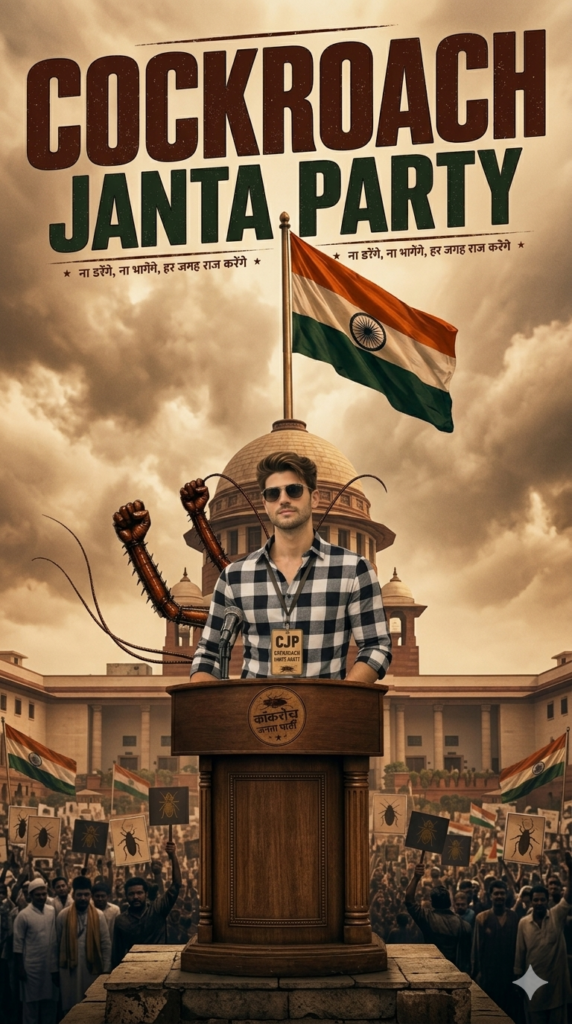
Prompt: An ultra-realistic, cinematic photograph captures a chaotic nighttime protest at India Gate. A young South Asian man, matching the reference details (e.g., specific hairstyle, features, and red jacket), is prominent in the midground, standing above the crowd with a fist raised and shouting aggressively. Smoke and warm orange streetlights create a dramatic, heavy atmosphere. The foreground features a surreal, highly detailed cockroach in tiny glasses standing at a wooden podium, speaking into multiple microphones. The podium has "COCKROACH JANTA PARTY" written on it. The focus is sharp on the man and the foreground cockroach, with a blurred, intense crowd behind. The vertical composition has a high-contrast, viral social media documentary aesthetic. (Aspect Ratio: 9:16)
IPL photo and video editing prompt
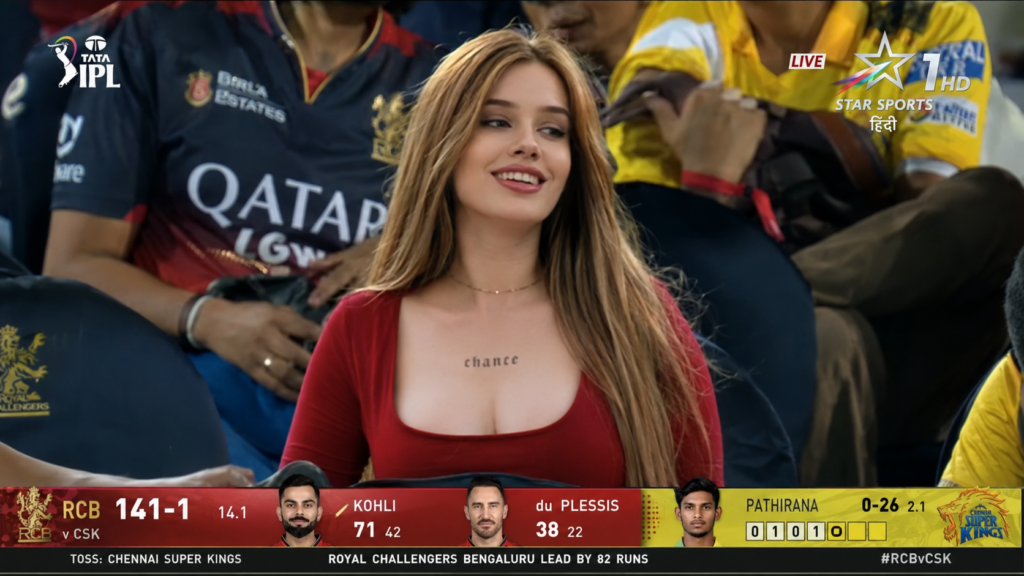
Photo prompt:- A screenshot from a live IPL cricket TV broadcast on Star Sports. The camera cuts to the audience — our reference image person sitting in the crowd, smiling naturally and unaware they’re on camera. The subject is seated in premium stadium seats near the boundary rope during a high-energy match between Royal Challengers Bengaluru (RCB) and Chennai Super Kings (CSK). Hardlock: Do not alter their facial structure, skin texture, or likeness in any way.The stadium atmosphere is electric — packed crowd, vibrant red and yellow team colors throughout the stands, dramatic stadium floodlights, flags waving, blurred motion from cheering fans in the background. Full authentic cricket broadcast overlay visible: IPL-style scorecard graphics, Star Sports logo watermark, over count, team scores, player stats ticker, match status. The game is IPL playoffs — Qualifier match atmosphere. RCB currently leading the series momentum after dominating previous matches against CSK.The image should look exactly like a real TV broadcast screenshot — realistic sports broadcast cinematography, live camera framing, authentic sports color grading, slight compression artifacts, interlacing grain, subtle motion blur, realistic depth of field from a broadcast zoom lens, candid audience capture aesthetic.16:9 aspect ratio, ultra-realistic live sports broadcast feel, indistinguishable from an actual televised IPL match screenshot.
Video prompt:- make her smile and add hand gesture with hello moment your camera
viral selfie sticker prompt
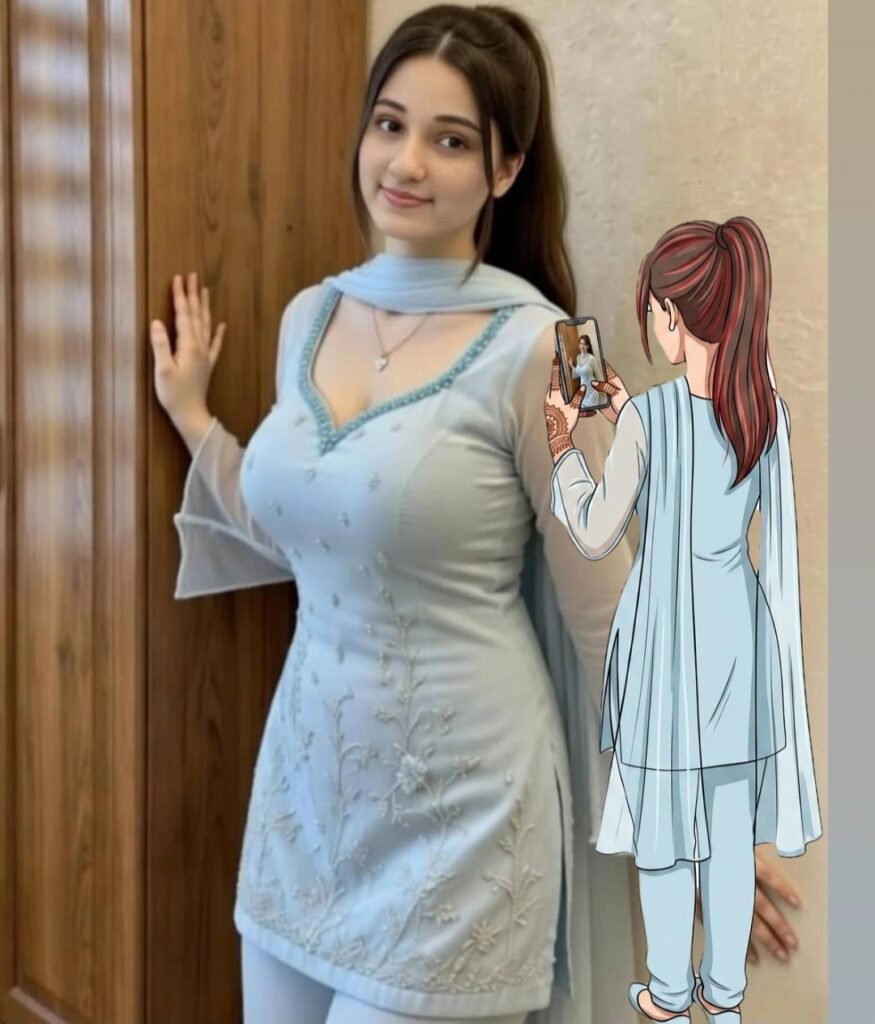
Prompt:- An anime-style full-body ilustramon, viewed from the back. The person is standing and holding a smartphone up to take a picture of the person on the image. The person is wearing the same outfit as the person in the picture and looks identical make the background white The art style has bold, dark outlines and flat, clean colors, blending 2D character art with a photo background
Prompt: 1
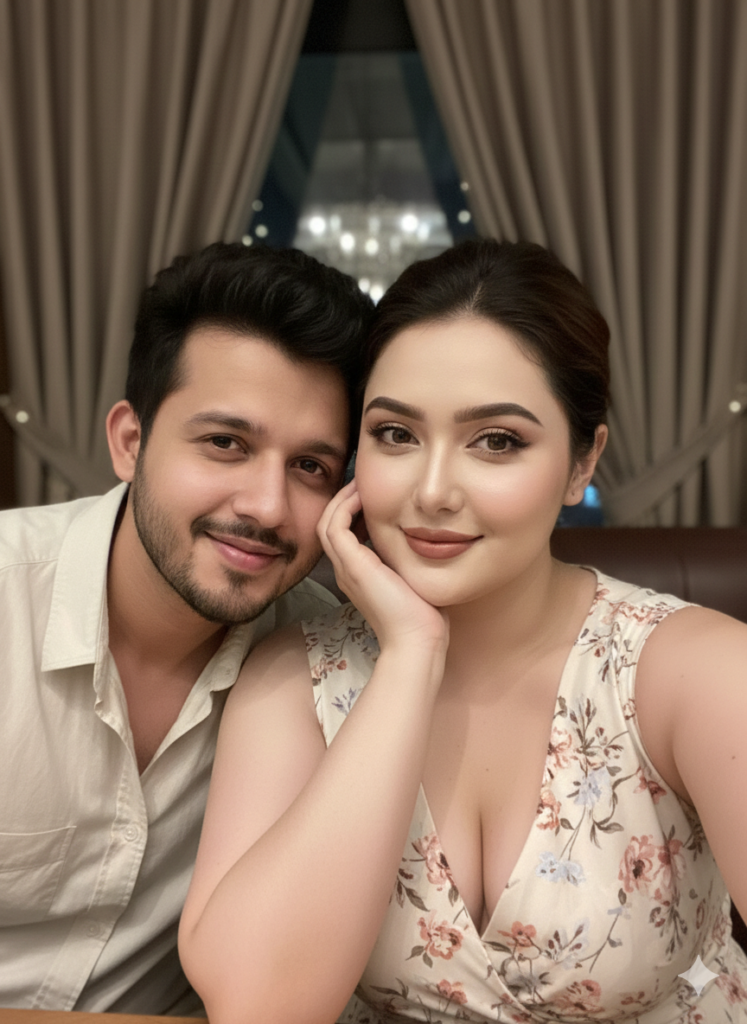
Candid indoor close-up couple selfie, cozy restaurant/bar setting, soft ambient light with gentle flash. Girl in the foreground resting her cheek on one hand, wearing a light floral sleeveless dress, soft blush, and glossy lips, relaxed smile. Boy leaning in from the left, casual shirt, warm friendly expression. Curtains and dim lights in the background, natural skin texture, smartphone front-camera selfie feel, real candid vibe.[LOCK-EXACT | same pose, same framing, same angle, same lighting, same expressions, zero variation]Ultra HD 8K, Ratio 9:16, keep my face 100% same as in the reference image. Generate
Why Viral AI Images Look So Professional
Viral AI photos are not created using magic. They follow a simple formula:
- High-quality reference image
- Long and descriptive prompt
- Proper lighting and camera details
- Cinematic color grading keywords
- Realistic texture instructions
Once you understand this structure, you can easily recreate viral-style images on your own.
How to Further Enhance Your AI Images
Even after generating an AI image, you can improve the final result by applying a few extra techniques.
1. Improve Prompt Details
Always add specific words like:
- “cinematic lighting”
- “soft rim light”
- “film grain”
- “HDR look”
- “natural skin tones”
Small details make a huge difference.
2. Use Style References
Mention styles such as:
- Hollywood portrait style
- Fashion editorial look
- Movie poster aesthetic
- Dark cinematic tone
This helps the AI follow a clear artistic direction.
3. Adjust Mood and Emotion
You can enhance realism by adding emotions like:
- Calm expression
- Serious cinematic mood
- Confident look
- Soft smile with dramatic tone
4. Upscale and Sharpen
After generating the image, you can use free AI upscaling tools to increase resolution and sharpness for social media or thumbnails.
Common Mistakes to Avoid
- Using very short prompts
- Uploading low-quality images
- Forgetting lighting and camera details
- Expecting perfect results on the first try
Always experiment and tweak your prompt slightly for better results.
Final Thoughts
AI photo editing is becoming extremely popular, and Gemini makes it even easier for beginners to create professional and cinematic images for free. You don’t need to know the exact viral prompt—once you understand how prompts work, you can create even better images on your own.
Use the prompts shared in this article, experiment with different styles, and keep improving your prompt structure. With practice, your AI images will look just as cinematic and professional as the viral ones you see online.